3D Model Viewer: open GLB, glTF, FBX, OBJ and STL files online
Drop a 3D file and inspect it right away: materials, texture channels, wireframe, UVs, skeleton, animations, real dimensions and the pivot. Free and without sign-up.
Your file never leaves your device
Drop a 3D file here
GLB, glTF, FBX, OBJ, STL, PLY, 3MF, DAE, USDZ or a ZIP with textures
Your file never leaves your device. Everything is processed in your browser.
Model library
How to view a 3D model online
- Drop a model onto the viewer or click Open files. For a glTF or OBJ with textures, select all files together, drop the whole folder or drop a ZIP.
- Orbit with the mouse or one finger, zoom with the wheel or a pinch. Lighting, background, up axis and file unit are under View.
- Check the model: texture channels, UV checker, normals, wireframe, skeleton, bounding box and pivot. The Info tab lists counts, texture memory and possible problems.
- Play animations and scrub the timeline, save a high resolution PNG or convert FBX, OBJ, STL and other formats to GLB.
What you can inspect
- Texture channels
- Base color, normal, roughness, metallic, AO and emissive one by one, plus a UV checker and a normals view.
- Topology and rig
- Wireframe, skeleton overlay, bounding box, triangle, vertex and draw call counts.
- Scale and pivot
- Real dimensions in metres and inches, a metric grid, Y up or Z up, and whether the origin sits at the base.
- Scene and materials
- A clickable outliner to hide or isolate parts, every material with its values and every texture with resolution and memory.
Supported 3D formats
| Format | Files | What the viewer shows | Notes |
|---|---|---|---|
| GLB, glTF 2.0 | .glb, .gltf + .bin + textures | Meshes, PBR materials, textures, skeleton, animations, morph targets | Draco, Meshopt and KTX2 compressed files work. |
| FBX | .fbx + textures | Meshes, materials, embedded and external textures, skeleton, animations, morph targets | Materials appear as the FBX stores them (Phong). PBR maps from some tools are not read. |
| OBJ | .obj + .mtl + textures | Meshes, groups, MTL materials with base color, normal, bump, roughness and metallic maps | OBJ has no skeleton or animation. PBR values from the MTL (Pr, Pm, map_Pr, map_Pm) are shown as PBR materials. |
| STL | .stl (binary, ASCII) | One mesh, vertex colors if present | No materials or UVs. Opens as Z up in millimetres. |
| PLY | .ply | Meshes or point clouds, vertex colors | Point clouds are drawn as points. |
| 3MF | .3mf | Meshes, colors, base materials | Opens as Z up in millimetres. |
| DAE (Collada) | .dae + textures | Meshes, materials, textures, skeleton, animations | Up axis and unit stored in the file are applied. |
| USDZ | .usdz | Meshes, materials and textures | Basic support. Complex USD scenes can appear incomplete. |
| ZIP | .zip | Any format above together with its textures | The archive is unpacked in your browser. |
Input and output: examples from the library
One page for every common 3D file: use it as a GLB viewer, a glTF viewer or an STL viewer online. Drop a GLB file and this GLB file viewer shows materials, textures and animations. Drop an STL file and the STL file viewer reads it in millimetres with Z up and shows its real size. The two library models below open with one click.
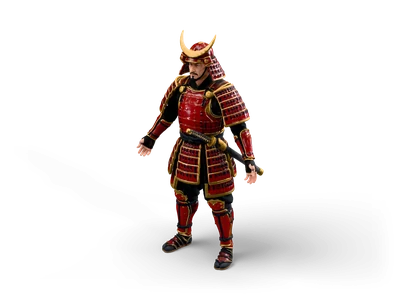
Samurai
- Input
- Samurai: the rigged web preview of a High Detail character with a humanoid skeleton and the clips walk and run.
- Output
- The Animation tab plays and scrubs the clips, the skeleton overlay shows every bone and the Info tab lists triangles, materials and texture memory.
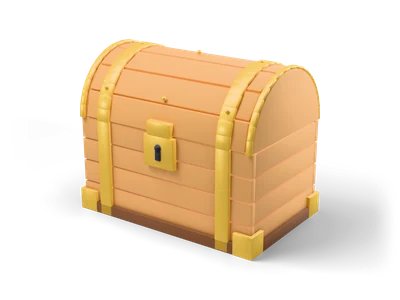
Treasure Chest
- Input
- Treasure Chest: a Lightweight prop with 2K PBR textures (base color, roughness, metallic and normal).
- Output
- Each texture channel on its own, a UV checker, the wireframe, the real size in metres and inches and where the pivot sits.
What it does not do
- The library links open the web preview of a model, which is compressed and can be lighter than the download. Download the full file from the model page to inspect it in full resolution.
- An STL file has no materials, textures or UVs, so it shows in one neutral material.
- The viewer shows a model, it does not repair it or check wall thickness for 3D printing.
Frequently asked questions
Is my 3D file uploaded to a server?
No. The viewer runs in your browser. Your file is read locally with JavaScript and WebGL and is never sent anywhere. Only the viewer code, the lighting and the decoders for compressed files are loaded from this website.
Which file formats can I open?
GLB and glTF 2.0, FBX, OBJ with MTL, STL, PLY, 3MF, DAE (Collada) and USDZ. You can also drop a ZIP or a whole folder, so that textures and .bin files load together with the model.
Can I use it as an STL viewer?
Yes. Drop a binary or ASCII STL file and the STL viewer opens it in millimetres with Z up, shows its real size and triangle count and lets you check it in wireframe. STL has no colours or textures, so the model shows in one neutral material. For GLB files the same page is a GLB viewer online with textures, materials and animations.
Is there a file size limit?
There is no fixed limit. Files are processed in the memory of your device, so the practical limit depends on your browser and RAM. Large files show a progress bar. Phones and tablets have less memory and can fail on very large models.
Can I play animations and see the skeleton?
Yes. Animations from GLB, glTF, FBX and DAE files are listed in the Animation tab. You can play, pause, change the speed and scrub the timeline. The skeleton overlay shows the bones, and morph targets get their own sliders.
Does the viewer support Draco compressed GLB files?
Yes. Draco and Meshopt compressed meshes and KTX2 textures are decoded in your browser. The Info tab lists the glTF extensions a file uses, so you can check which compression is applied.
Why does my OBJ or glTF look grey?
The textures are separate files. Select the model together with its .mtl or .bin file and all texture images, drop the whole folder or pack everything into a ZIP. Missing files are listed under Checks in the Info tab.
Can I convert FBX or OBJ to GLB?
Yes, with limits. Convert to GLB exports the visible parts with materials, textures and animations. Phong and Lambert materials from FBX and OBJ become approximated PBR materials, and no compression is applied. Check the result before you use it in a project.