Transparency
How our 3D models are made
No model on Grab3D is carved by hand, and we don’t pretend otherwise. Many start as an AI-generated draft and are then corrected in Blender. Our kits are built by scripts. What they share is the part that takes the most time: checking, fixing and exporting until every file is right.
Last updated:
- models online
- 803
- High Detail
- 102
- Lightweight
- 701
- kits
- 22
- rigged models
- 24
- file formats
- 5GLB · FBX · .blend · USDZ · OBJ
Two ways a model starts
Every model goes one of two ways. We don’t label each model with its route. Instead, it carries a quality tier that tells you what you get.
ARoute A · AI draft + correction
From a reference image to a corrected model
For organic, detailed subjects (animals, creatures, characters, anatomy) we first create a reference image, usually one clean three-quarter view, made for this purpose with an image generator rather than taken from photos or other people’s artwork. An image-to-3D generator turns it into a draft at the highest geometry and texture setting. The draft is never published as it comes out.
- Result: High Detail tier
- PBR textures, 4K in the download
- Selected bipeds get a rig
BRoute B · procedural kit
Kits built by scripts in Blender
Simpler objects such as furniture, vehicles, buildings, props and plants are built procedurally: Python scripts in Blender define shapes, proportions, palette and materials, and bake wear such as dirt and edge scuffs into PBR textures. That is why every piece of a kit shares one consistent style. No AI model generates the shapes or textures. The scripts themselves are written with the help of an AI coding assistant and checked by us.
- Result: Lightweight tier
- Mostly 2K PBR textures
- Moving parts as separate objects
The workflow, step by step
Both routes end in the same checks. The lane markers show which route a step applies to.
$ reference.png → draft.glb $ blender -b -P kit.py -
Clean up the geometry
ARemove duplicate fragments and tiny splinters, handle holes carefully (functional openings such as spokes or ear holes stay open), smooth the noisy generated surface and reduce it to the download budget.
-
Scale, pivot, orientation, names
ABReal-world size in meters, pivot at the base center so the model stands on the ground, level (small corrections only), front facing forward, object and material names set to the model name instead of “mesh_0”.
-
Moving parts and textures
ABLids, doors, wheels or a trebuchet arm are separate objects with sensible pivots. Generated textures are checked and re-encoded, kit textures are baked from the palette and wear passes. Maps: base color, roughness, metallic, normal.
-
Two quality levels
ABA Draco-compressed web preview for the 3D viewer on the site, and the download in full quality without mesh compression. A lighter GLB/FBX is added only where it removes at least 30 % of the triangles.
-
Rigs and low poly variants
ASelected biped characters are rigged automatically, get walk and run clips and are checked in motion. Some High Detail models also get a separate low poly version derived from them.
-
Visual check
ABEvery model is rendered from four angles under neutral studio light and looked at, with extra views from behind and above for multi-part subjects.
-
Export and re-import
ABAll formats are exported from one master file, then re-imported and compared with it: dimensions, triangle count, ground contact, textures, wheel pivots. The target is zero problems.
-
Publish or reject
ABOnly a model that passed, has its previews and texts in English, German and Spanish goes online. Everything else stays offline until it is fixed, or is dropped.
What “correction in Blender” means
- Fragments and splinters
- Generated meshes often carry loose duplicate shells that sit almost on top of the main surface, plus tiny detached splinters. They cause dark patches and flickering, so they are removed (with size limits, because a filter that is too greedy once ate real parts of a model).
- Surface noise
- Generated surfaces are finely noisy. When the mesh is reduced, that noise turns into visible wedges, so the reduced mesh is smoothed again afterwards.
- Holes, but not all of them
- Only small gaps are closed. Openings that belong to the object, like the spaces between bicycle spokes, stay open.
- Scale and stance
- The longest dimension is set to a plausible real size, the pivot moves to the base center, and the model is levelled only when the correction is small. A slightly tilted whale is better than one rotated by an algorithm guessing its “ground”.
- Textures
- Maps are checked, logos or lettering are removed where they appear, and the textures are re-encoded so a 4K download does not carry a bloated file.
How the kits are built
Each kit has its own small toolbox of Python functions for its typical shapes, a fixed palette and a brief that describes every piece. Pieces are generated headless in Blender, then weathered: dirt, rust and edge wear are baked into the PBR textures, while glass and glowing parts stay clean.
Two sample pieces are built and approved first so the style is fixed before the rest of the kit follows. After each round the pieces are rendered and compared side by side, so a kit reads as one set rather than a pile of individual models.
Rigs and low poly variants
- Rigged characters
- Biped characters can be rigged automatically. They get a humanoid skeleton and two in-place clips, walk and run. The rigging step replaces the texture with a weaker one, so we bake the original texture back onto the rigged mesh and check the result in motion. Four-legged animals cannot be rigged this way, so they are offered unrigged.
- Low poly versions
- Some High Detail models get a separate low poly model: the detailed mesh is remeshed, reduced step by step, and its colors are transferred into a small palette texture. That is how the wolf became the low poly wolf, with its own page.
Quality control
One view hides too much: an ear can look intact from the front and broken from behind. So every model is looked at from four angles under neutral studio light, without color grading, and we check for:
- floating or tilted models
- holes and missing parts
- dark patches and streaks
- detached small parts
- details missing compared with the reference
- the front facing the wrong way
- separate parts that have grown together
Models that fail are corrected, generated again or dropped. Rejected models do not go online.
Files you get
All formats are exported from the same master file and checked after re-import, so they match in scale and orientation.
No download uses Draco or other mesh compression, so every GLB opens directly in Godot, in Unity with glTFast (no Draco package), in Unreal and in Blender. Only the 3D preview on this website is Draco-compressed so it loads fast. Want smaller files? Compress a copy yourself with gltf-transform.
Median full-quality GLB (models online): High Detail 26 MB at 799,998 triangles, Lightweight 1.1 MB at 13,694 triangles. 235 models also offer a lighter GLB/FBX, and 29 low poly models are derived from High Detail models.
Origin in every download
We don’t mark each model page with its route, but every download package says how the model was made. LICENSE.txt has a short section “Origin / AI disclosure”, and manifest.json has an origin field: “ai-assisted” for route A models, including their rigged and low poly variants, and “procedural” for the route B kits. Right now 131 of the models online are AI-assisted and 672 are procedural. If you publish on a platform that requires disclosure of AI-generated content, such as Steam (Steamworks content survey), treat AI-assisted models as AI content. For procedural models no AI model produced the geometry or textures, but their generator scripts were written with an AI coding assistant. The files say so too (ai_assisted_code in manifest.json), so you can answer a question about AI in the creation process correctly. More in the FAQ.
Two real examples
Both models are online and downloadable, and the numbers below are read from their files.
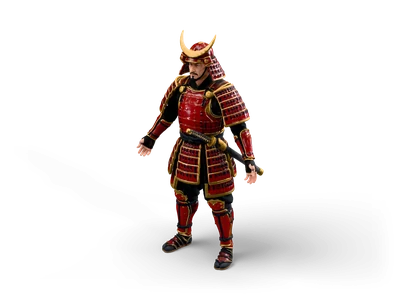
ARoute A: Samurai
Samurai
Generated from a single three-quarter reference image, then cleaned up, scaled to 1.75 m, set on its base and exported. The rigged variant carries a walk and a run clip.
- Triangles
- 800,000
- Textures
- 4K PBR
- Size (W × D × H)
- 1.06 × 0.66 × 1.75 m
- Download (GLB)
- 29 MB
- Rigged variant
- walk + run
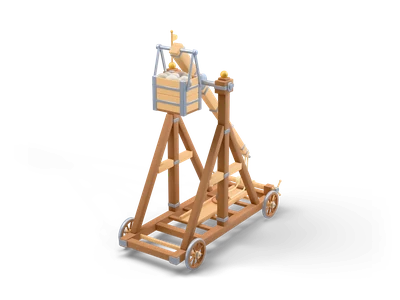
BRoute B: Trebuchet
Trebuchet
Built by script as part of a kit. Arm, counterweight, sling and the four wheels are separate objects, so a full shot can be animated without a rig.
- Triangles
- 26,518
- Textures
- 2K PBR
- Size (W × D × H)
- 3.33 × 6.72 × 7.57 m
- Download (GLB)
- 1.3 MB
Why we can release the models under CC0
We create every draft ourselves, from reference images made for this purpose, using generation services whose terms allow us to use the results commercially and to pass them on. The corrections, rigs, variants and all kit scripts are our own work, the scripts written with the help of an AI coding assistant.
Where rights exist in the result, they are ours to give up, and CC0 1.0 does exactly that: we waive them worldwide, as far as the law allows. In many countries purely machine-generated content may not be protected by copyright at all. With CC0 you get the same clear answer either way.
Subjects are generic: no brands, logos or real people. If you ever find something that looks like it shouldn’t be there, tell us and we will check it.
This is our explanation of how the models come about, not legal advice. CC0 license explained
What we don’t claim
- Our models are not handmade, and we never label them that way.
- AI drafts can hide errors we miss despite the checks. If you find one, write to us and we fix or remove the model.
- High Detail models are heavy by design (hundreds of thousands of triangles). For crowded game scenes, use the lighter file, a low poly version or your own LODs.
- Automatic rigs have limits: a humanoid skeleton without finger or face bones, and only walk and run clips.
Questions about the process?
Write to info@grab3d.com. We also answer the uncomfortable questions.