GLB Optimizer: compress glTF files and reduce polygons in the browser
Drop a GLB or glTF and make it smaller and faster: merge duplicates, simplify the mesh, resize and re-encode textures, add Meshopt or Draco compression and export a whole LOD chain. Before and after sit side by side in 3D with the same camera. Your file never leaves your device.
Drop a GLB here or pick a library model.
Press Optimize to see the result.
How it works
- Drop a .glb file, or a .gltf together with its .bin and texture files. You can also start from a model in the Grab3D library.
- Choose how far to reduce: a percentage or a target triangle count. Max. deviation stops the simplifier before thin parts break apart.
- Set the largest texture size and the format. WebP and JPEG make files much smaller, PNG stays lossless.
- Pick a geometry compression, press Optimize and compare both versions in 3D. Download the optimized GLB or a ZIP with the whole LOD chain.
Which compression for what?
Smaller is not always better. Draco and Meshopt need a decoder in the program that opens the file, so choose them for the web and keep an uncompressed copy for editing.
- None
- Plain glTF geometry. Every engine, viewer and 3D program can open it. The right choice for Blender, Godot, Unity and Unreal imports.
- Meshopt
- EXT_meshopt_compression: small files that decode very fast. Readable by three.js, Babylon.js and model-viewer. Good for web games and 3D product viewers.
- Draco
- KHR_draco_mesh_compression: often the smallest geometry, decoding takes a little longer. Readable by three.js, Babylon.js, model-viewer and the Blender importer.
- WebP textures
- EXT_texture_webp: textures are often a third of the PNG size. Web viewers and Godot 4 read them. For other importers choose JPEG or PNG.
Input and output: examples from the library
Use it as a GLB compressor or to reduce polygons. These are two different steps: compression (Meshopt or Draco for the mesh, WebP or JPEG for the textures) makes the file smaller and keeps the shape, simplification removes triangles and changes the shape slightly. To compress a GLB file for the web you can combine both.
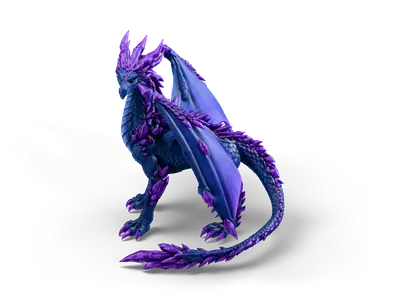
Crystal Dragon
- Input
- Crystal Dragon: the web preview of a High Detail model (2.3 MB). The full GLB download has 799,999 triangles and 30 MB.
- Output
- A smaller GLB with the reduction, texture size and compression you set, and a before and after table of file size, triangles and texture memory.
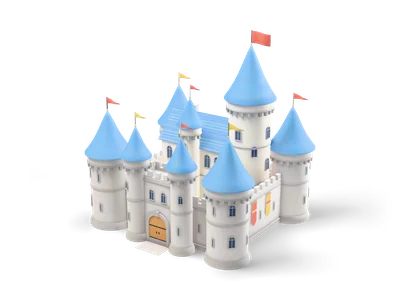
Castle
- Input
- Castle: a Lightweight building with 48,980 triangles in the full download, a typical background asset.
- Output
- A LOD chain as one ZIP, for example versions at 50, 25 and 10 percent of the triangles for distant views.
What it does not do
- Draco and Meshopt files need a decoder in the program that opens them. Keep an uncompressed copy for editing and engine imports.
- The library links load the web preview, which is already Draco compressed. To optimize the full quality file, download the GLB from the model page and drop it here.
- It reads and writes glTF and GLB only. It is not an STL or OBJ simplifier.
Frequently asked questions
Is the GLB Optimizer free?
Yes. It runs in your browser with no account, no watermark and no file size limit other than your device memory. Optimized files are yours to use, also commercially.
How do I compress a GLB file?
Drop the GLB, leave Simplify off and choose Meshopt or Draco for the geometry plus WebP or JPEG for the textures. Used like this the optimizer is a GLB compressor: the file gets smaller and the shape stays the same. Reduce polygons only if the model is still too heavy, and check that your engine or viewer reads the compression before you ship the file.
Is my model uploaded?
No. The file is read and processed in a Web Worker inside your browser with glTF-Transform and meshoptimizer compiled to WebAssembly. Nothing is sent to a server.
How do I reduce polygons without holes or broken parts?
Start with 50 percent and look at the wireframe. If thin parts like straps, leaves or antennas fall apart, lower Max. deviation. If the target count is not reached, raise it. Lock open borders keeps the outline of open meshes such as capes or terrain chunks unchanged.
Which texture size should I use?
For web and mobile 1024 px is usually enough, for close ups on desktop 2048 px. Halving the size saves three quarters of the texture memory on the graphics card, which matters more than the file size for performance.
Does Draco or Meshopt work in Godot, Unity and Unreal?
Godot’s built in glTF importer cannot read Draco or Meshopt compressed files. Unity needs extra packages for them and other importers vary. For engine imports choose None and use the compression only for files that are shown on the web.
What is a LOD chain?
Levels of detail are versions of the same model with fewer triangles. The engine shows the lighter version when the object is far away. The ZIP contains LOD0 (full) down to LOD3 (10 percent) as separate GLB files, ready for a LOD group in Unity, Unreal or Godot.
Why is the result of a library model so small?
Library models load as the compressed web preview, which is already optimized. The full download on the model page has higher resolution textures and is the better starting point for your own LODs.
Are animations, rigs and morph targets kept?
Yes. Skins, bones, animations and morph targets stay in the file. Simplification keeps the bone weights of the remaining vertices, so rigged characters still deform. Check the result in your engine before you replace the original.
Create texture maps in the Normal Map Generator → Render the result as a turntable GIF → All free tools →