Convert GLB to STL for 3D printing
Slicers expect one mesh in millimetres with Z pointing up. The converter merges all visible parts into one binary STL, scales it from metres to millimetres, turns it to Z-up, puts it on the build plate and checks whether the mesh is watertight.
Your files never leave your device
Drop a file to see it here.
How it works
- Drop a GLB, or any other supported format.
- Keep the 3D printing preset on: millimetres, Z-up, origin at the bottom center. Check the size in the info panel.
- Convert and read the check. Open edges are holes your slicer has to repair. Download the STL.
What is kept and what to watch
- STL stores geometry only. Colors, textures and materials are dropped.
- Parts are merged into one file, not fused: overlapping parts stay separate shells. Most slicers print that fine.
- Game and scan models are often not watertight. Repair them in your slicer or a mesh tool before printing.
Input and output: examples from the library
Two library models show what the GLB to STL converter writes. Each link opens the model on this page with the 3D printing preset already on.
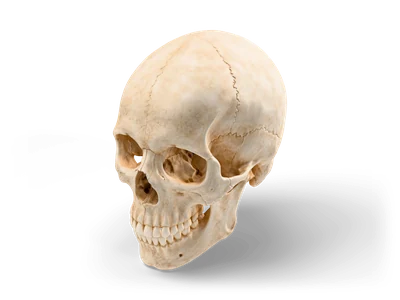
Human Skull
- Input
- Human Skull: a detailed anatomy model with 799,999 triangles in the full download. The link loads its lighter web preview.
- Output
- One binary STL in millimetres, Z up, placed on the build plate, plus the check that counts open edges and edges shared by more than two triangles.
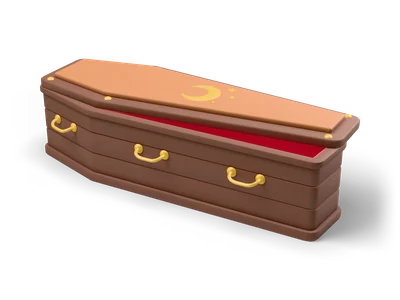
Coffin
- Input
- Coffin: a Lightweight prop made of separate parts (box and lid) with 2K textures.
- Output
- Both parts in one STL file as separate shells. Colours and textures are dropped because STL stores geometry only.
What it does not do
- An STL export does not prove that a model is printable. The check finds holes and bad edges, it does not test wall thickness, overhangs or tiny details.
- Game models are made for screens: thin parts, open backs and overlapping pieces are common. Repair and scale them in your slicer before you print.
- The library links use the web preview. For the full resolution mesh, download the GLB from the model page and drop it here.
Other conversions
Frequently asked questions
Is my STL printable?
The converter counts open edges (holes) and edges shared by more than two triangles. With zero of both the mesh is watertight. Wall thickness and overhangs are not checked, your slicer shows those.
Why is the model tiny in my slicer?
The file was written in metres. Turn on the 3D printing preset or set the unit to millimetres before converting.
Can I scale the model to a print size?
The converter keeps the real size of the model. Scale it in your slicer, which also shows print time and material use.